
OfficeRPC
Share Your Work with Friends
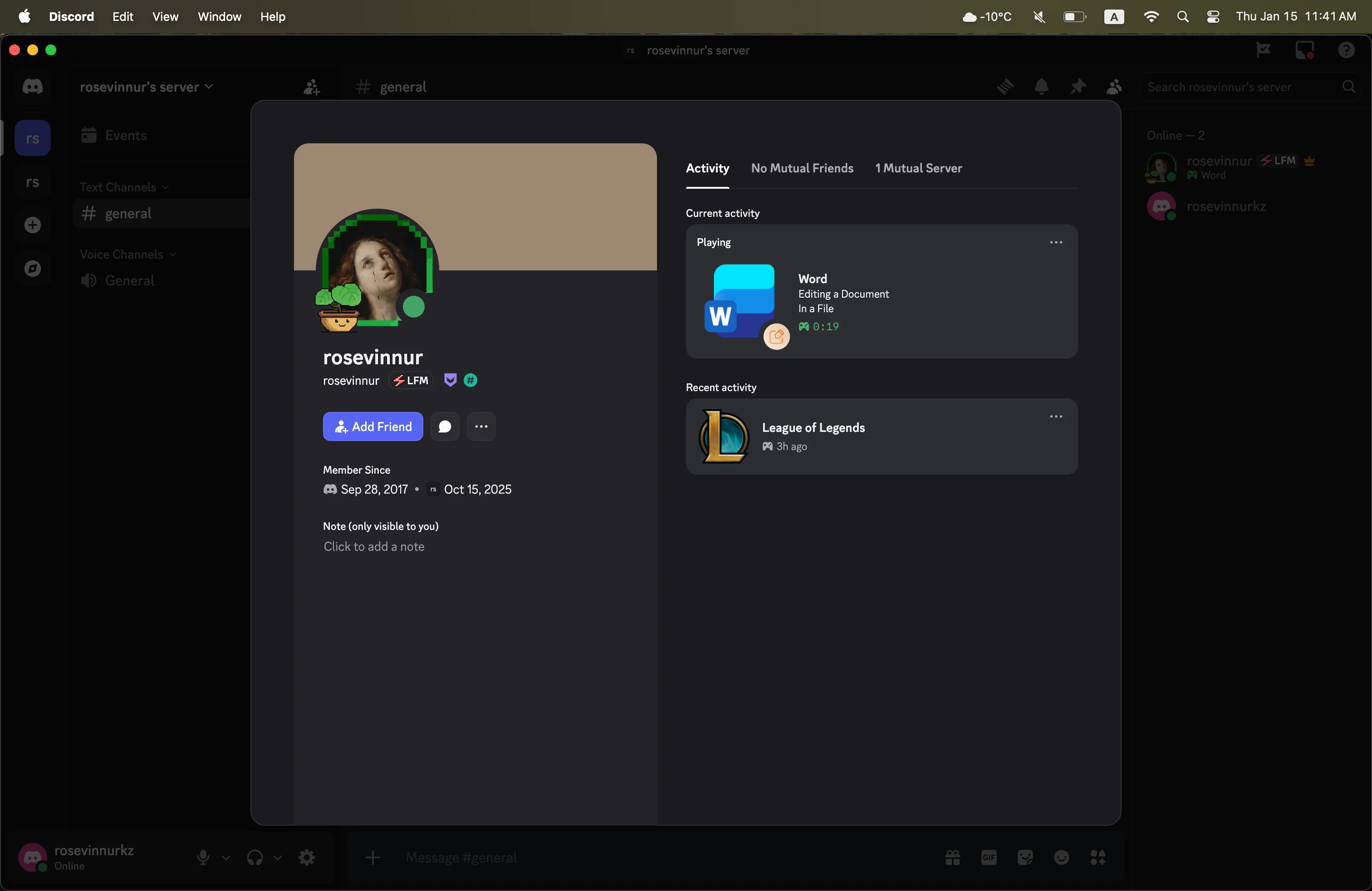
Show your friends on Discord what you're working on in Microsoft Office - automatically and effortlessly. OfficeRPC shares your activity in Word, Excel, and PowerPoint directly to Discord. No more manual status updates - the app does it for you, showing which document you have open right now.
Why Choose OfficeRPC?
Works Automatically
No Extra Clicks Needed
- ✓ Just open a document, and your friends will instantly see that you're working
- ✓ Real-time status updates when you switch documents
- ✓ Seamless integration with Microsoft Office
- ✓ Works with Word, Excel, and PowerPoint
- ✓ No manual configuration required
Privacy Protection
Your Control, Your Privacy
- ✓ Hide file names if you don't want to share details
- ✓ The app will simply show "In a File" instead of the actual name
- ✓ All data processed locally on your Mac
- ✓ No information sent to third-party servers
- ✓ Full compliance with Apple's privacy guidelines
Smart Management
Intelligent Activity Tracking
- ✓ The app knows when you're active
- ✓ Automatically hides your status when you step away
- ✓ Shows what matters - displays the document you're currently working on
- ✓ Handles multiple open documents intelligently
- ✓ Smart detection of active vs inactive states
Multi-Document Support
Focus on What Matters
- ✓ If you have multiple documents open, the app displays the one you're currently working on
- ✓ Automatically switches between active documents
- ✓ Works with Word, Excel, and PowerPoint simultaneously
- ✓ Shows the most relevant activity
Stays Out of Your Way
Background Operation
- ✓ Runs quietly in the background
- ✓ Never distracts from your work
- ✓ Doesn't clutter your desktop
- ✓ Menu bar integration for quick access
- ✓ Minimal system resource usage
Auto-Start Support
Set It Up Once
- ✓ Set it up once - and the app will work every time you start your Mac
- ✓ Simple, fast, and hassle-free
- ✓ Automatic launch on system startup
- ✓ No need to remember to start it manually
- ✓ Seamless background operation
Screenshots
×
![Screenshot]()
Get Started in 3 Simple Steps
1
Install
Download & Install OfficeRPC
Download the latest version for macOS. Simply drag the app to your Applications folder and launch it.
2
Configure
Set Up Your Preferences
Choose whether to show file names or keep them private. Enable auto-start if you want the app to launch automatically.
3
Work
Start Using Office
Open any document in Word, Excel, or PowerPoint and watch your Discord status update automatically!
System Requirements
💻 macOS Version
- macOS 14.0 (Sonoma) or later
- Compatible with Apple Silicon (M1/M2/M3) and Intel Macs
📱 Required Applications
- Microsoft Office: Word, Excel, or PowerPoint (any version)
- Discord: Desktop app or web version
🔑 Permissions
- AppleEvents access (required to check Office application status)
- Background app permissions (for continuous monitoring)